Over the next few months I will be adding more pages to my Portfolio, but
before we start I would like to take this opportunity in thanking Red Rose Web Design
this wonderful opportunity in learning something I never thought I could achieve months back...
"THANK YOU VERY MUCH"
This is a simple page consisting of:
A Header Image
Three Complimentary Tiles
(a solid, a gradient and a patterned tile)
Enter Button

The Image is my header that will be my opening to my future site
"Mystikal Visionz"
The artist I used, Robin McQuay is one of my favorite artists
and can't believe I found an image to match the title to my future site.
You can purchase the works of Robin McQuay at
"Up Your Art"
The three complimentary tiles used for the background
were made from these swatches...
#ffffff #80989a

The Pattern and Gradient were made from the Swatches
and the White Swatch was also used for the Background
To make the Gradient Tile I had the darker color swatch for the foreground and the lighter color
as the background. I clicked on the foreground and then click on gradient
My setting to make the gradient is...
Angle: 25
Repeats: 15
Invert: Checked
Style: Radial
Horizontal: 50
Vertical: 50
Go to File New Image size 100 x 100 pixels flood filled with white then
add a new raster layer and flood fill with the gradient merge.
using these settings to make a seamless tile...
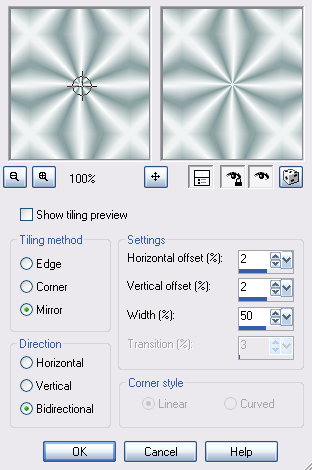
The end results...

To make the Pattern Tile I used the darker color swatch and flood filled a
new image size 100 x 100 pixels. I then used the PSP Effects - Texture called
08fpaper_pracken with the default settings, and the results are...

there was no need to make the tile seamless
Lastly was to make the Solid Tile by flood filling a new image 100 x 100 pixels
with the color white and the results are...
#ffffff

Click on the Enter Button to proceed to Lesson 2
or Click on the Drop Down Menu to Proceed to Further Lessons

I hope you enjoy your visit, and it would make me happy if you sign my guestbook ;0)


Please feel free to Contact Me
Designed by AngelAD taught by "Red Rose Web Design 2007"